“I put in effort but see no results.”
Ready-made fixes
Pick a hint like Stronger opening, Stronger ending (CTA) or More engaging instead of rewriting by hand.
Pick a length and a hint, or write your own instruction. POSTIVA rewrites the text in your editor in your brand’s voice and keeps your previous version one arrow away.


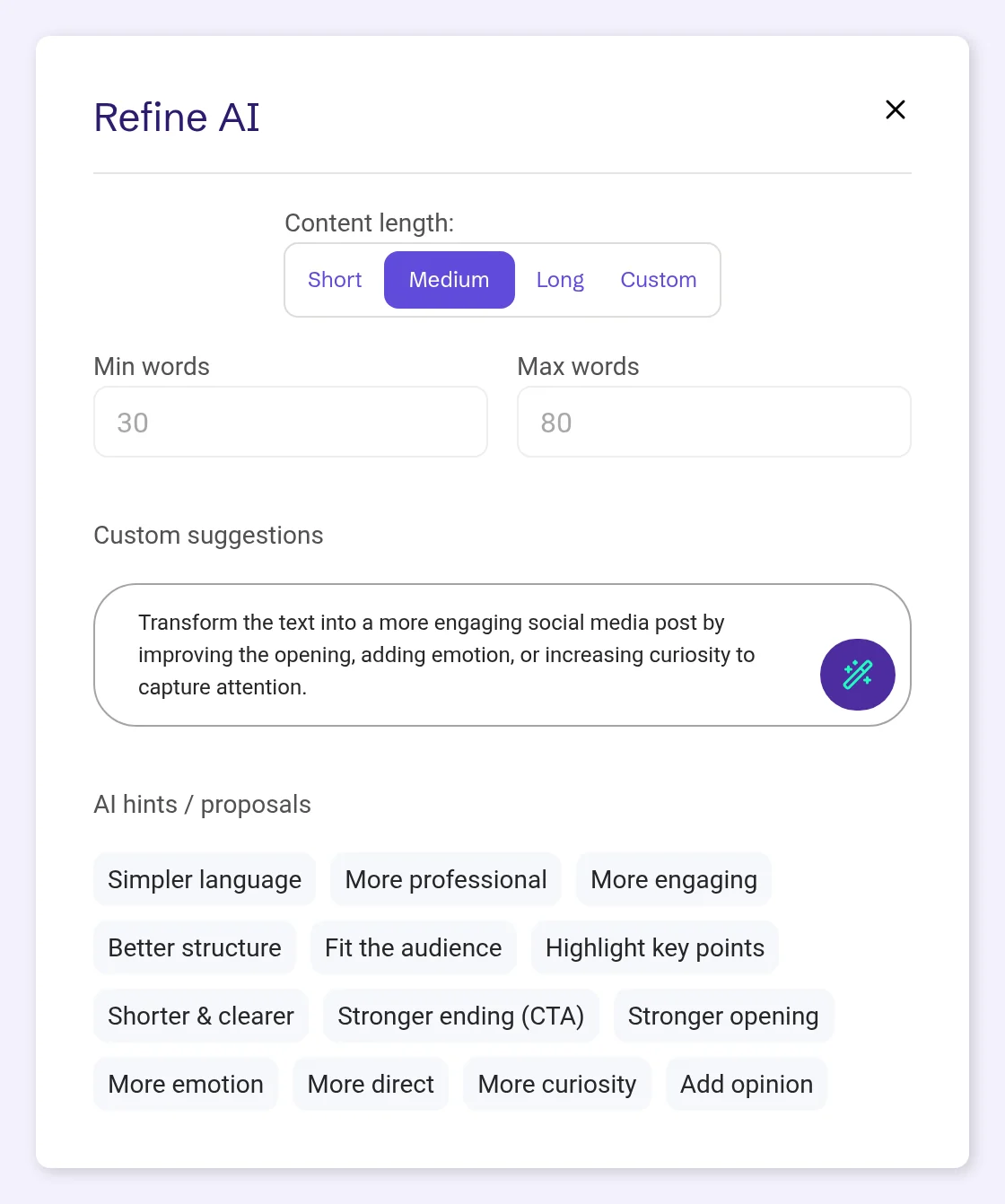
Refine AI sits next to Inspire AI in the post editor and works on the text that’s already there: your own draft, a post from the AI assistant or anything you’ve pasted in.
Choose how long the post should be: Short (10–30 words), Medium (30–80 words, the default), Long (80–250 words) or Custom, with your own minimum and maximum.
Then tell it what to improve. Thirteen ready-made hints cover the usual fixes, from Simpler language to Stronger ending (CTA). Or write your own instruction.
The rewritten text is added to the editor as a new text version, in the brand voice from your profile. Your previous versions stay one arrow away.
“I put in effort but see no results.”
Pick a hint like Stronger opening, Stronger ending (CTA) or More engaging instead of rewriting by hand.
“My content will stop sounding like me.”
The enhancer writes in the brand voice from your profile, so a polished post still sounds like you.
“I’m not good enough at social media.”
Each rewrite is a new version. If you liked the earlier one better, it’s one arrow away.
“I have too many apps and mental chaos.”
No copying text into another tool. Refine AI works in the post editor, on the text you already have.
Write or paste your text in the post editor, then tap Refine AI next to Inspire AI (on mobile: Refine). It works on the editor’s current text.

Under Content length:, Short is 10–30 words, Medium 30–80 (the default) and Long 80–250. Custom lets you set Min words and Max words yourself.

Under AI hints / proposals, tap a chip to put its instruction in the field: Simpler language, More professional, More engaging, Better structure, Fit the audience, Highlight key points, Shorter & clearer, Stronger ending (CTA), Stronger opening, More emotion, More direct, More curiosity or Add opinion. A hint replaces what’s in the field, so they work one at a time.
Prefer your own words? Write them in Custom suggestions.
Tap the wand button in the Custom suggestions field to rewrite the text.
The rewritten text is added to the editor as a new text version, in the brand voice from your profile. Your previous versions stay one arrow away, so you can go back at any time. Then save the post as usual.

In the post editor: tap Refine AI next to Inspire AI (Refine on mobile).
It rewrites in the brand voice from your profile, so the result still sounds like your brand. Hints like More professional or More emotion adjust the tone of this one post.
Yes. The rewritten text is added as a new version, and your previous versions stay one arrow away.
Choose Custom and set Min words and Max words. Or pick Short (10–30 words), Medium (30–80) or Long (80–250).
Yes. Each run counts toward your plan’s Content Optimization allowance. When you reach the limit, the app tells you.
Create an account and polish your next post in your brand’s voice.
No card required. FREE forever.