“I can’t do everything myself.”
Share the work
A teammate or freelancer works in your profile with their own account.
Invite a teammate or freelancer to work in your profile with their own POSTIVA account. Turn on approval, and nothing they write goes live until you say so.


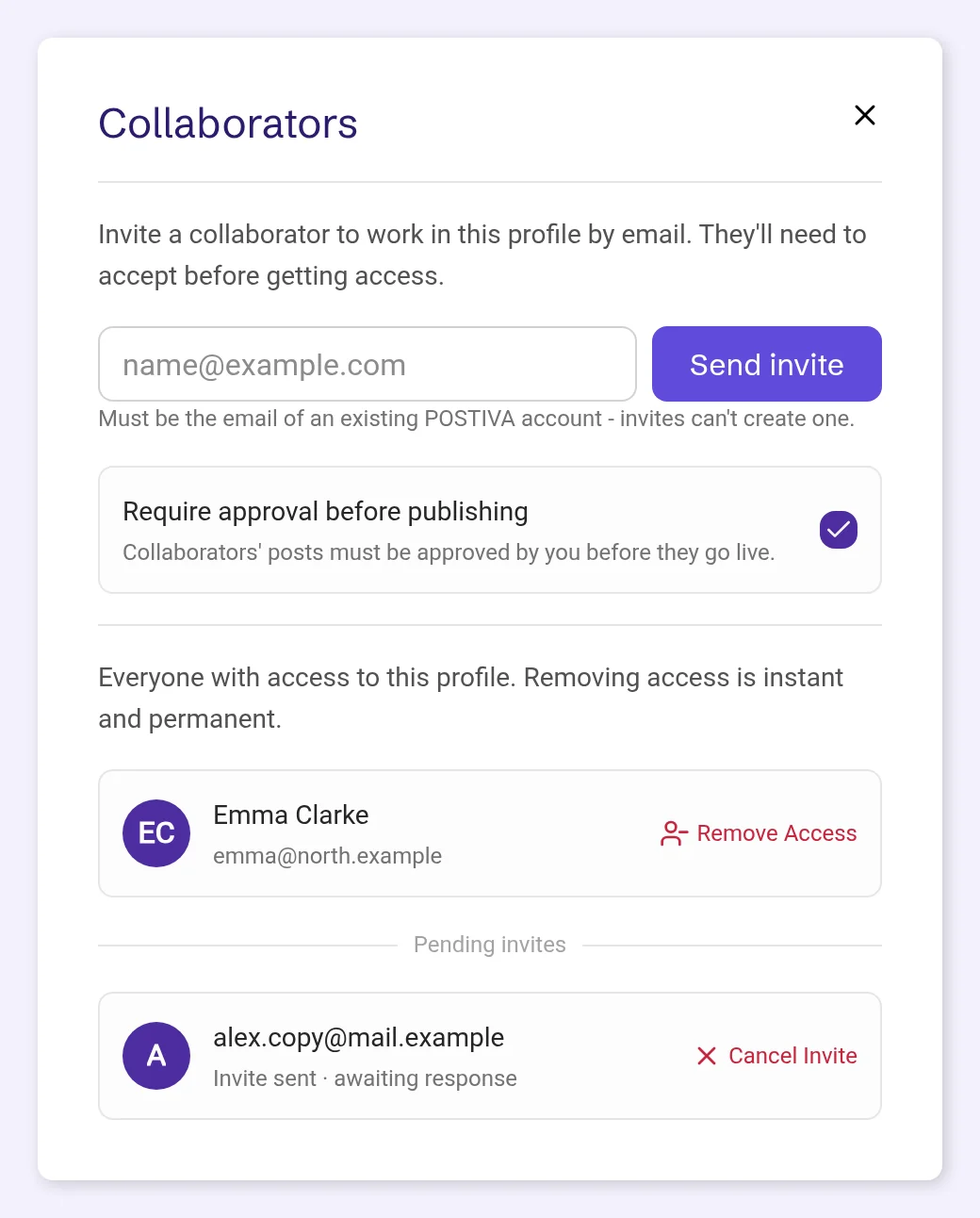
In Collaborators you invite someone to your profile by email. They use their own POSTIVA account and accept the invite before they get access, so you never share your login.
Inside the profile, a collaborator can do everything the work needs: write posts, use the AI chat and ideas, check analytics and work with files. Profile settings, connected platforms, invites and access, history import and approving posts stay with you. Every AI action a collaborator takes counts against your plan.
Turn on Require approval before publishing and collaborators submit their posts for your approval instead. You approve or reject each one, and a rejected post goes back to its author with your reason.
“I can’t do everything myself.”
A teammate or freelancer works in your profile with their own account.
“I don’t want to hand out my passwords.”
Collaborators can’t change profile settings or connected platforms. Only you can.
“What if something goes out I haven’t seen?”
With approval on, every collaborator post waits until you approve it.
“Feedback gets lost in messages.”
Reject a post with a reason, and the author sees it on their draft until they resubmit.
On your profiles screen, open the ⋮ menu on your profile card and choose Collaborators. Only the profile’s owner sees this option.
Sharing needs a paid plan, CREATOR or PRO. On FREE you’ll see Sharing isn’t available on your plan.

Enter the person’s email: Must be the email of an existing POSTIVA account – invites can’t create one. Then choose Send invite. If they don’t have an account yet, POSTIVA tells you: This person doesn’t have a POSTIVA account yet. Ask them to sign up, then invite them.
The invite waits under Pending invites as Invite sent · awaiting response. Cancel Invite withdraws it.

They get an email, You’ve been invited to collaborate, and a card on their profiles list with Accept and Decline. You get an email when they accept or decline.
In your profile they see a Shared by [your name] badge and the banner You’re working in [your name]’s profile.

Tick Require approval before publishing in Collaborators: Collaborators’ posts must be approved by you before they go live. Posts your collaborators already scheduled move to pending.
Collaborators now see Submit for Approval. A submitted post shows Pending Review and is locked until you review it. Turning approval off later doesn’t approve posts that are already pending: they stay pending until you review them.

You get an in-app notification, and in My posts the Needs Approval filter shows what’s waiting. Open the post and choose Approve, then confirm, or Reject.
Reject asks for a reason: Tell the author what needs to change… The post goes back to its author as a draft with Rejected: and your reason, and they can resubmit it. If an approved post’s time has already passed, it returns to draft instead of publishing late. Editing an approved post sends it back for approval.

In Collaborators, choose Remove Access next to the person. Removing access is instant and permanent. Their posts and scheduled posts stay in your profile, and they get an email: Your access was revoked.

Yes. Invites go to the email of an existing POSTIVA account, and the person accepts the invite before they get access.
Everything inside the profile: posts, AI chat, ideas, analytics and files. Profile settings, connected platforms, invites and access, history import and approving posts stay with you.
Not when Require approval before publishing is on. Then their posts wait as Pending Review until you approve or reject them.
No. Sharing a profile needs a paid plan, CREATOR or PRO.
Yours. Every AI action a collaborator takes in your profile counts against the owner’s plan.
They stay. Removing access is instant, and the collaborator’s posts and scheduled posts remain in your profile.
Create an account, invite a collaborator on CREATOR or PRO and decide what goes live.
No card required. FREE forever.