“I have a million ideas but zero execution.”
Know what to do today
Pick a day and the tasks are already there. No list to write, no wondering where to begin.
Pick a day in your weekly plan and see what's worth doing: comments to answer, a post to prepare, or a well-earned rest. POSTIVA lets you know when a new daily plan is ready. New tasks every day on CREATOR and PRO; on FREE you get your first day's plan.

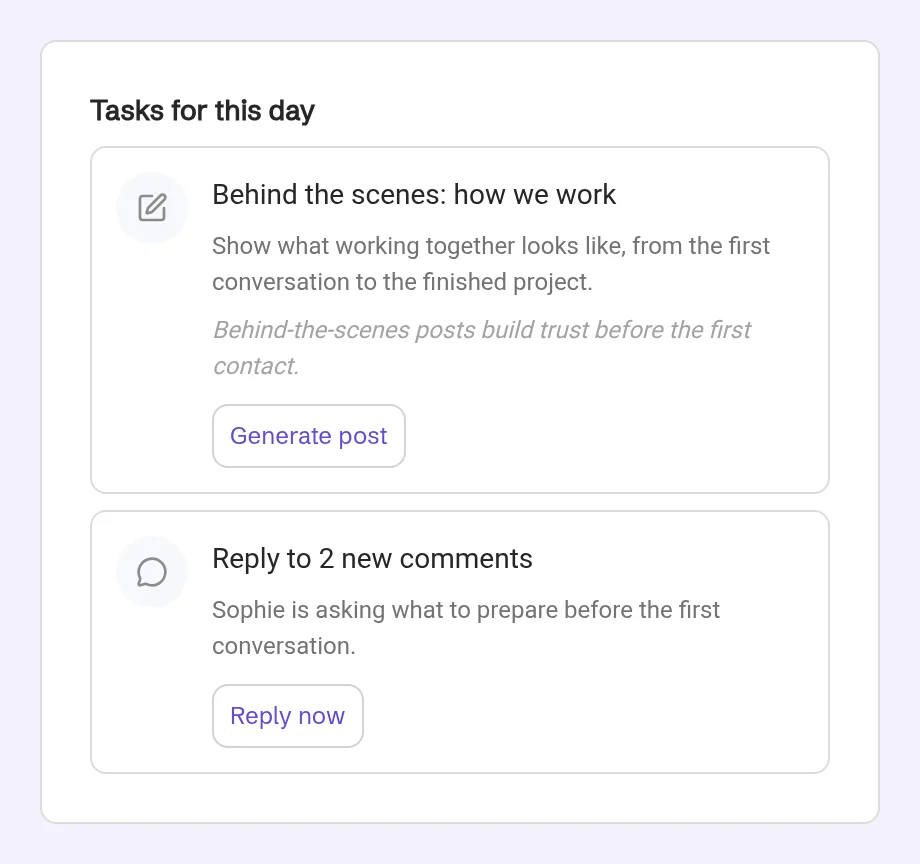
Your daily plan is part of Weekly Strategy, on the Plan tab. Pick a day, and Tasks for this day shows everything worth doing that day.
It brings two things together. First, the actions from your weekly plan, each with a title and a short rationale. Then the day's AI tasks: replying to comments, creating a post or a Reel, improving your profile, engaging with others, reviewing your analytics, repurposing content, batching ideas or boosting a post. Some days it's a story or poll idea, or simply a rest day: “don't post today”.
Each task shows an icon, a title, a description and often a short reason, so you know why it matters today. Comment tasks come with a Reply now button that opens the comments area. Other tasks are guidance you act on yourself. To create the day's post, use Create post on the day's main post card.
When a new daily plan is ready, POSTIVA sends a push notification with a short summary of the day. And if nothing is scheduled for next week, you'll hear about that too.
Weekly Strategy with sample data for a fictional business. Your plan is built around your profile.
“I have a million ideas but zero execution.”
Pick a day and the tasks are already there. No list to write, no wondering where to begin.
“I start, then burn out.”
A few doable tasks, and a rest day when the plan calls for one. Steady beats a sprint.
“I lose track and post chaotically.”
Actions from your weekly plan and the day's AI tasks sit together under Tasks for this day, so nothing gets lost.
“I feel pressure to be online all the time.”
A push notification tells you when a new daily plan is ready, and lets you know when next week is still empty.
Describe your business. Creating your first plan usually takes a few minutes and prepares your first strategy and that day's tasks, on FREE too. Then a short tour shows you around: Strategy, the Plan tab, that day's post, Create post and the AI chat.

In Weekly Strategy, switch to the Plan tab and choose a day of the week. When there's something to do that day, you'll find it under Tasks for this day.

First come the actions from your weekly plan, each with a title and a short rationale.
Below them are the day's AI tasks. Each one shows an icon, a title, a description and often a short reason.

Reply now opens the comments area. Other tasks are guidance you act on yourself.
To create the day's post, use Create post on the day's main post card. The editor opens with the suggested time when one is set.

In the iOS and Android apps, notifications follow your device's notification permission for POSTIVA. On the web, open Notifications in the header and choose Enable notifications. POSTIVA then sends a push notification when a new daily plan is ready, with a short summary of the day.
If your browser blocks notifications, you'll see Blocked in browser instead. If it doesn't support web notifications, the option doesn't appear.

In Weekly Strategy, on the Plan tab. Pick a day and look for Tasks for this day.
Every pricing plan, FREE included, gets the first strategy and that day's tasks after you create a profile. New tasks every day come with CREATOR and PRO. Compare plans.
POSTIVA sends a push notification with a short summary of the day. In the iOS and Android apps, it follows your device's notification permission for POSTIVA. On the web, turn it on in the header's Notifications panel with Enable notifications.
No. Daily plans arrive as push and in-app notifications only.
A push and an in-app notification tell you that nothing is scheduled for next week.
Describe your business and get your first strategy and today's tasks, free.
No card required. FREE forever.