“I don’t know which posts actually worked.”
Your best posts, spotted
POSTIVA compares each post with your own average, so you don’t have to.
POSTIVA keeps an eye on how your posts do. It tells you when a recent post is trending and when an older top post is worth sharing again. On every plan, FREE included.


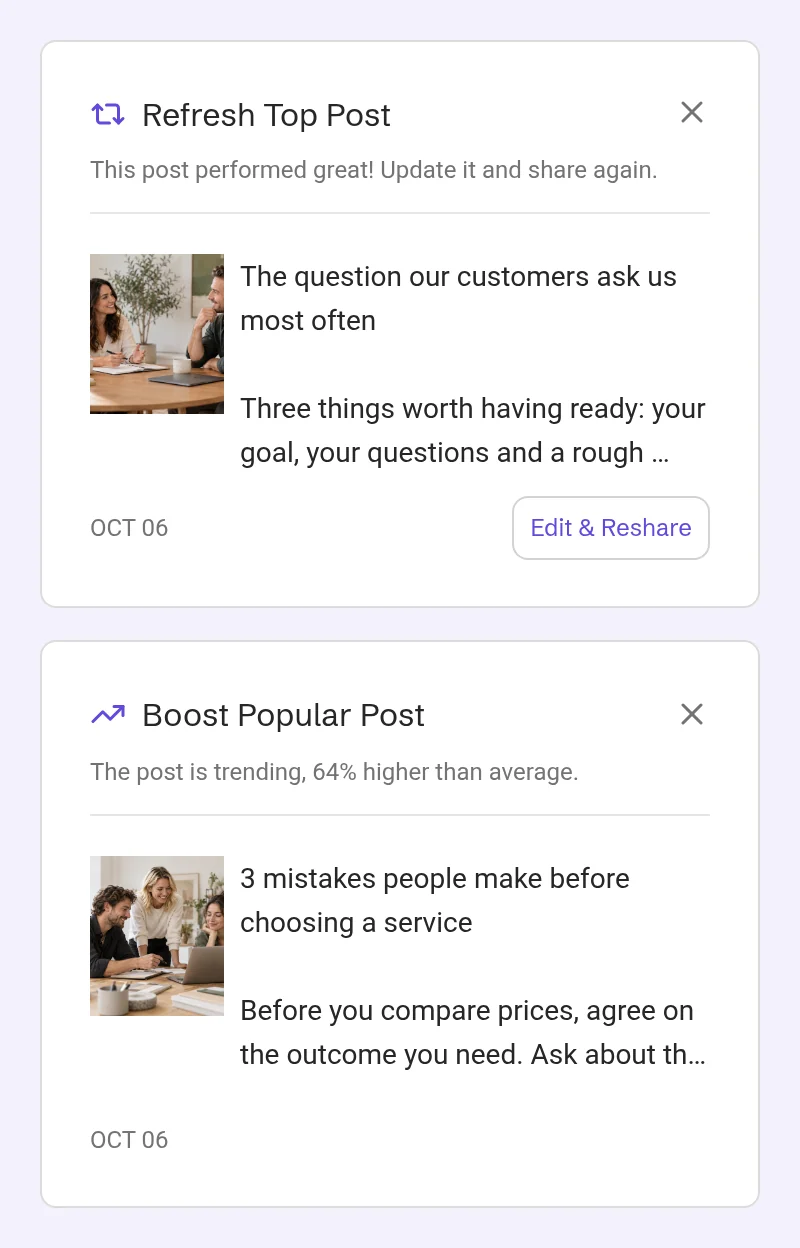
Under Analytics → Suggestions, POSTIVA lists posts worth a second look. It checks every 4 hours and suggests each post only once. New suggestions also arrive as notifications; tap one to open the post.
Boost Popular Post appears when a post from the last 90 days gets at least 1.5× your average engagement (reactions plus comments) and was recently active (its metrics changed in the last 14 days). The card tells you how far above average it is. It’s a recommendation to consider promoting that post yourself, while it’s doing well.
Refresh Top Post appears for a post 2–12 months old that did at least 1.1× the average of your posts from that same 2–12-month period. One tap opens the post, so you can update it and share it again.
Each card shows the post’s image, text and date. Other cards may appear on the same screen too.
“I don’t know which posts actually worked.”
POSTIVA compares each post with your own average, so you don’t have to.
“I always start from a blank page.”
Give a proven post a fresh take instead of writing a new one from scratch.
“By the time I notice a hit, it’s old news.”
A notification arrives when a recent post is taking off.
“Another tool full of alerts.”
Each post is suggested only once, and the X marks a suggestion as read.
In the sidebar, under ANALYTICS, open Suggestions. New suggestions also arrive as notifications; tap one to open the post.

Switch between Unread and Read, and narrow the list by Suggestion type. The list covers the last 180 days.

The card says “The post is trending, …% higher than average.” It’s a recommendation to consider promoting that post yourself while it’s doing well. The card has no button, and your daily plan may also include it as a task.
The card says “This post performed great! Update it and share again.” Tap Edit & Reshare to open the post, then give it a fresh take and share it again.

Tap the X on a card to mark the suggestion as read. You’ll find it under Read.

No. Boost Popular Post points out a post that’s doing well, so you can decide whether to promote it yourself. The card has no button that does it for you.
Reactions plus comments. POSTIVA compares each post with your own average.
Suggestions need a connected Facebook or Instagram account with post metrics. Boost Popular Post needs at least 20 posts in the last 90 days, and Refresh Top Post needs posts that are 2–12 months old. Each post is suggested only once. Historical import can bring in your posts from the last 3 months.
Between 2 and 12 months old, with at least 1.1× the average engagement of your posts from that same 2–12-month period.
POSTIVA checks every 4 hours. Each post is suggested only once.
Yes. Post suggestions are on every plan, FREE included.
Create an account, connect Facebook or Instagram and let POSTIVA point out your best posts, on the FREE plan.
No card required. FREE forever.